REVI
•
JUN 2024 - DEC 2024
•
SHIPPED
Building the Foundation: Designing Access Control Across Revi's Multi-Platform Restaurant OS
This case study is part of a larger integration project between Revi and 7shifts. For the full story on that work, see the Revi Team.Revi is a SaaS platform for restaurant owners, giving them tools to run their business across multiple devices: a web dashboard for business management, a point of sale (POS) iPad for transactions, and a kitchen display (KDS) iPad for order management. As Revi grew into mid-market territory, one question kept blocking deals: how do we make sure the right people can only access the right things?That question became my problem to solve.ROLE
Lead Product Designer
PLATFORM
Web (Desktop, Mobile), Tablet (Apple, Android)
COLLABORATORS
QA Engineer, iOS/Web Engineers, PMs, Customer Success

THE CHALLENGE
The Challenge
Before a formal permission system existed, every Revi user had access to everything. For small single-location restaurants with family members as primary employees, this was manageable. For mid-market businesses with multiple staff members, shift managers, and higher transaction volumes, it was a liability.
Businesses were experiencing real, revenue-impacting system abuse:
Employees were using discount codes and issuing gift cards to friends without collecting payment
Staff could view internal sales reports they had no business seeing
Managers had no way to correct an employee’s missed clock-in or clock-out without contacting Revi's Customer Success team directly, costing Customer Success Managers hours per business that could have been directed towards growing businesses
On the dashboard side, mid-level restaurant owners had no way to give managers access to the areas relevant to their job without also giving them access to other sensitive data. Mid-market businesses were willing to work with Revi through its growing pains, but a basic security foundation was non-negotiable before they'd sign.
BUSINESS GOALS
Unblock mid-market sales by providing a security businesses could trust
Reduce POS-related revenue loss caused by employee system abuse
Ship a v1 permission system that could be built upon in future phases
USER GOALS
Control who can access sensitive business data across every device
Prevent unauthorized employee actions that impact revenue
Feel protected from day one, with smart defaults that secure the business even without manual configuration
THE FIRST ATTEMPT
…and why it didn’t work.
A permissions solution had actually been designed a year before this project began: 16 distinct roles, each with unique permission settings. On paper it was thorough. In practice, it was untestable.
We didn't realize the scale of the problem until we were halfway through testing. The combinations of roles, platforms, and permission states were so numerous that QA couldn't confidently validate the system. Shipping it would have meant releasing something we couldn't guarantee worked correctly, across three platforms, for every business type.
At this point, the PM team wanted to ship the 7shifts integration without permissioning at all to meet the deadline. Stakeholders and businesses, however, were firm: they needed security controls in place before going live. I proposed a third path.
How might we design a permission system simple enough for any restaurant owner to configure, while building a foundation that Revi could expand without starting from scratch?
1. MAKE COMPLEXITY FEEL SIMPLE
A multi-platform access control system should feel as easy to configure as flipping a switch, regardless of a business owner’s technical comfort level.
GOALS + NORTH STAR
2. BUILD A FOUNDATION, NOT A CEILING
Every v1 decision should make future phases easier to build on, not harder to undo.
RETHINKING THE APPROACH
Rather than ship a broken and complex system, I advocated for a simplified foundation we could actually build, test, and ship, then expand in future phases.
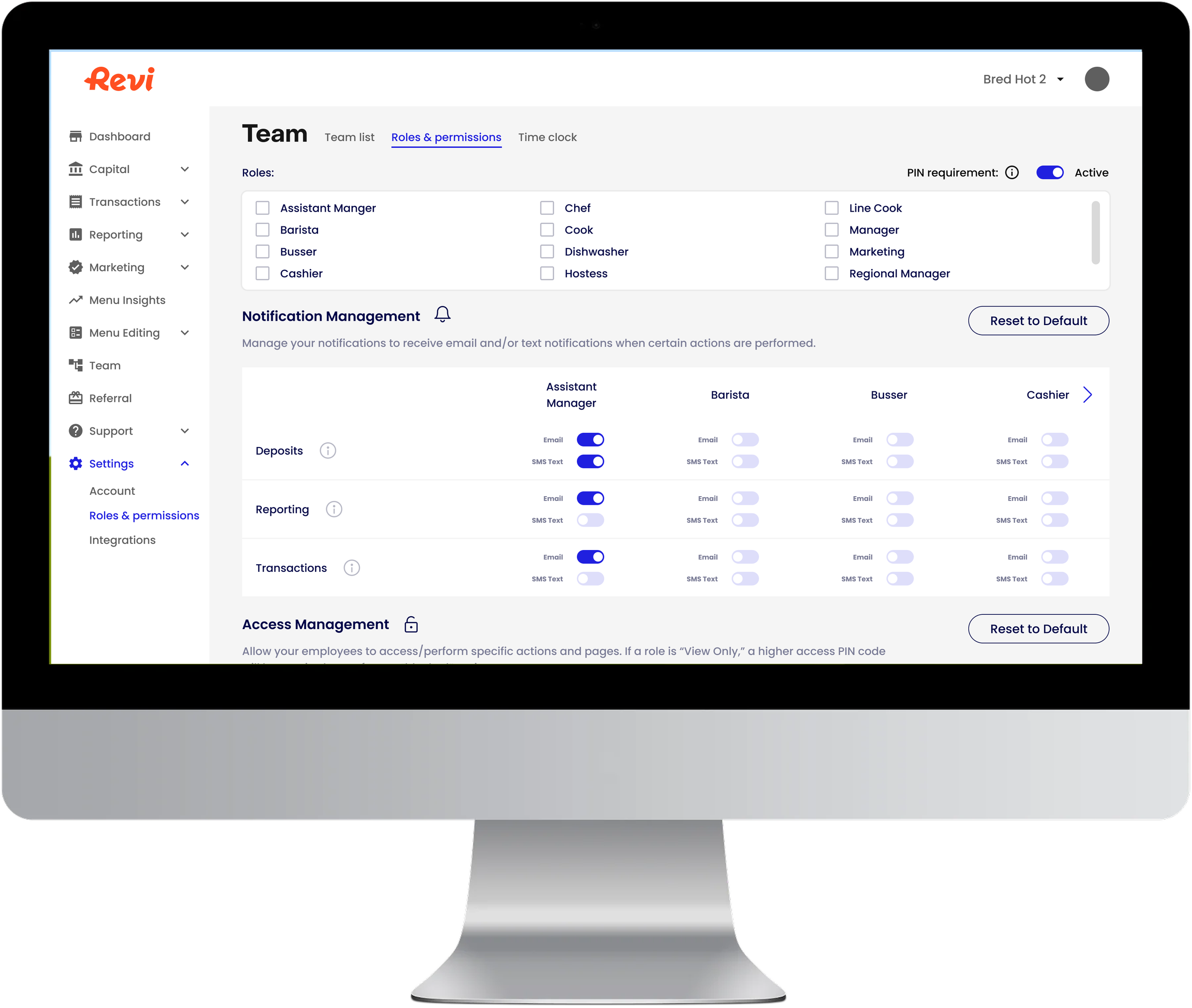
I ran a quick competitive analysis of Toast and Square to understand how established players structured their permission systems. Both grouped users into broad role buckets rather than offering fully custom per-user permissions from day one. Based on what I knew of our user personas, including owners, managers, cashiers, kitchen staff, and baristas, I mapped out an initial idea of three categories: Admin, Basic, and Limited
Before committing, I ran this by our Customer Success team and scheduled quick interviews with businesses that had previously used Toast or Square. The consensus: this would work as a foundation. They wanted more granularity eventually, but this was enough to sign on and begin.
I then worked closely with our QA lead, who had deep permissioning experience, to map exactly what each bucket could and couldn't do across each platform.
ADMIN
Business or franchise owners and various types of managers
BASIC
Front of house employees (cashiers, baristas, bartender, waiter, etc.)
LIMITED
Back of house employees (chefs, line cook, pastry chef, dishwashers, etc.)
BUILDING FOR THE FUTURE
The Challenge
From the start, I communicated to stakeholders and customers that this was a foundation, not a finished system. I created a phased roadmap to set expectations and build confidence. This framing helped businesses feel like they were investing in something being actively built, not just accepting a limitation. It also helped the Sales team close deals with a credible roadmap to point to.
MVP
Three permission buckets with platform-specific access controls across Dashboard and POS
PHASE 2
Customizable permissions per individual employee (the ‘rockstar employee’ model, where individuals can be given expanded access as they grow in their role)
PHASE 3
Page-specific workflow permissions on the dashboard
PHASE 4
Multiple location permission management
WEB DASHBOARD (DESKTOP + MOBILE)
Managing your business from anywhere
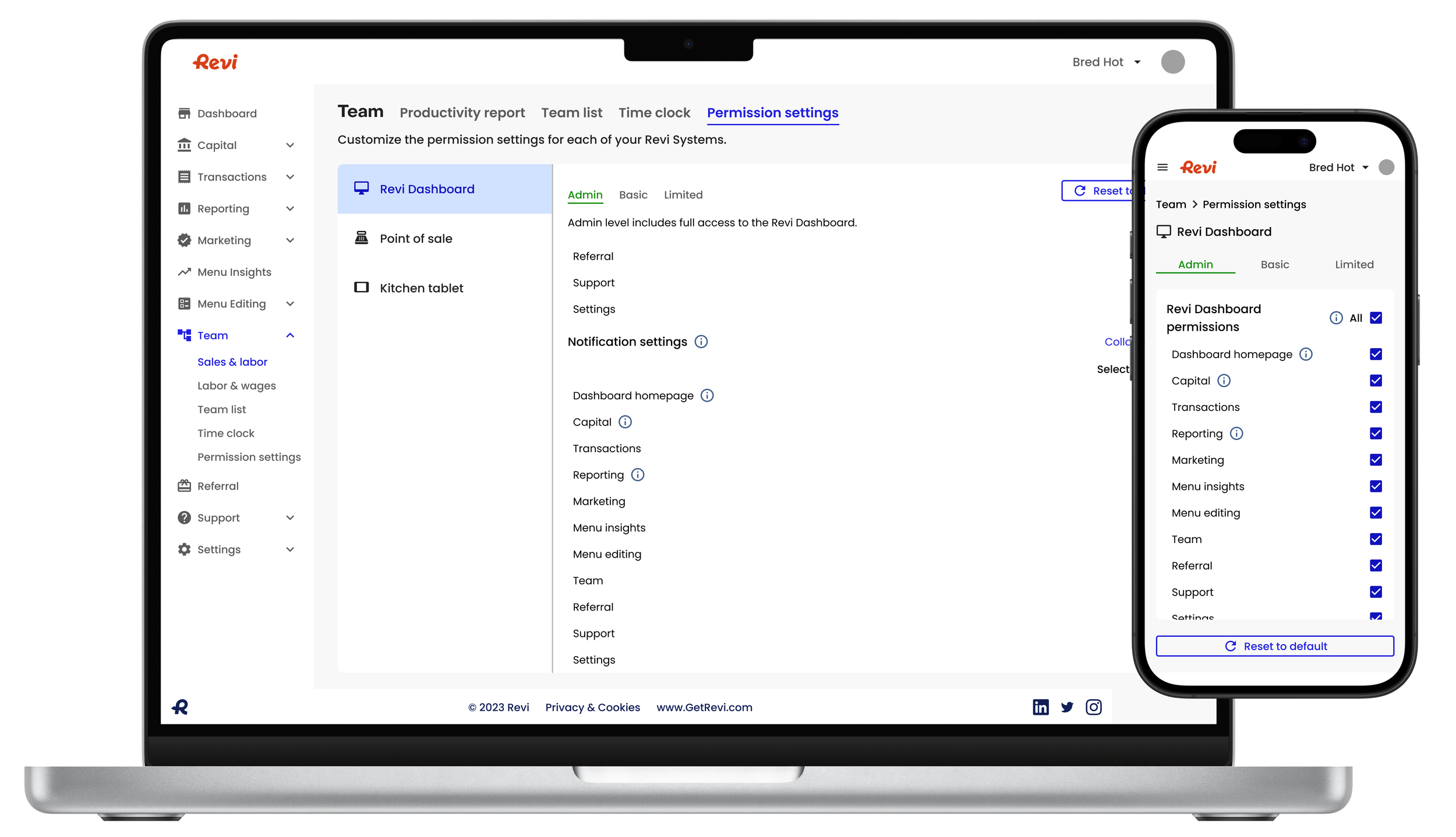
The dashboard is where owners and managers run the business from their office or on the go. Here, permissions were organized around pages: marketing, customer insights, labor data, employee management, and so on. Owners could grant or restrict access to each section per role. The goal was to give business owners confidence that sensitive data was protected without making the setup feel overwhelming.
DESIGNING ACROSS TWO PLATFORMS
POINT OF SALE (POS) TABLET
In-store permission management
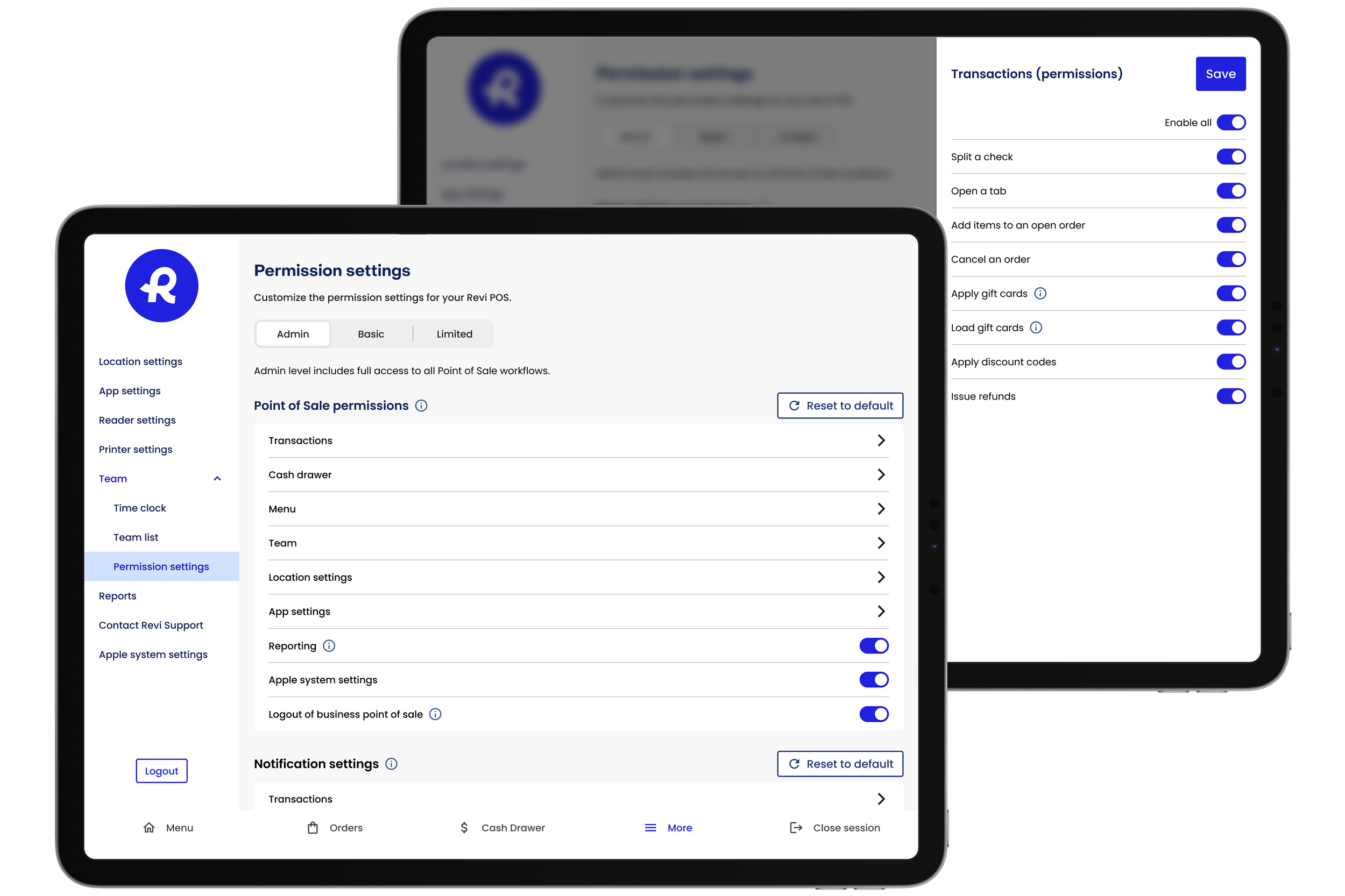
The POS is a transaction device. Its primary job is to take orders quickly. This meant stripping out anything that didn't belong in a transaction context and putting admin-only blockers where needed.
For employees (Basic), I worked with Customer Success to confirm which actions the average employee needs without manager approval to get through a shift. Those were available by default. Anything with abuse potential, such as discount code entry and gift card issuance, was restricted by default with an admin PIN override if needed.
For managers (Admin on POS), I removed complex reporting entirely and kept permissions focused on POS-specific settings. Quick admin tasks like editing or deleting shifts were available to reduce delays, since not all managers have dashboard access. Every interaction was designed to be fast, keeping the POS available for orders.
For clock in/out specifically, I designed a PIN-based flow with a target of under one minute, so shift transitions didn't create queues at the register.
FINAL OUTCOME
STAKEHOLDER TENSION
The pressure to ship without permissions was real. The deadline was tied to several large accounts the Sales team had been holding for months.
My position was straightforward: shipping without security controls would undermine the trust we were trying to build with exactly the customers we needed to close. A simplified but working permission system was better than none, and more honest than promising something we couldn't deliver yet.
By framing the simplified approach as a strategic phase rather than a compromise, I was able to get alignment across PMs, engineers, QA, and the exec team. The 16-role system was retired, and we moved forward with four buckets.
FINAL OUTCOME
CONCLUSION
The permission system shipped as part of the full Revi × 7shifts launch in Q3 2025.
Delivered a security foundation across Dashboard, POS, and KDS, with abuse-prone actions (discount codes, gift cards, shift edits, access to reports and employee contact info) restricted by default
Protected businesses from day one, even those who never configured their settings
Validated the four-bucket structure before build with Customer Success and businesses that previously used Toast or Square, who agreed it was a workable foundation
Gave Sales and Customer Success a credible phased roadmap to share with prospects and customers
FINAL REFLECTIONS
WHAT THIS PROJECT TAUGHT ME
Permissions isn't a UI problem. It's a logic problem that the UI has to express clearly. The hardest work wasn't designing the settings page, it was understanding the relationships between roles, platforms, and actions well enough to make decisions that would hold up across three different devices and dozens of different business types.
Getting that logic right, and communicating it simply enough that a non-technical business owner could configure it in minutes, was the real design challenge.
PRESSURE TEST COMPLEXITY EARLIER
The original 16-role system sat untouched for nearly a year before anyone tried to seriously test it. A simple QA walkthrough earlier in the process would have revealed the problem long before it became a timeline crisis.
INVOLVE QA IN THE DESIGN PHASE
Bringing our QA lead in during the redesign of the permission structure, not just at the testing stage, was one of the most valuable decisions I made on this project. That collaboration should have started earlier.